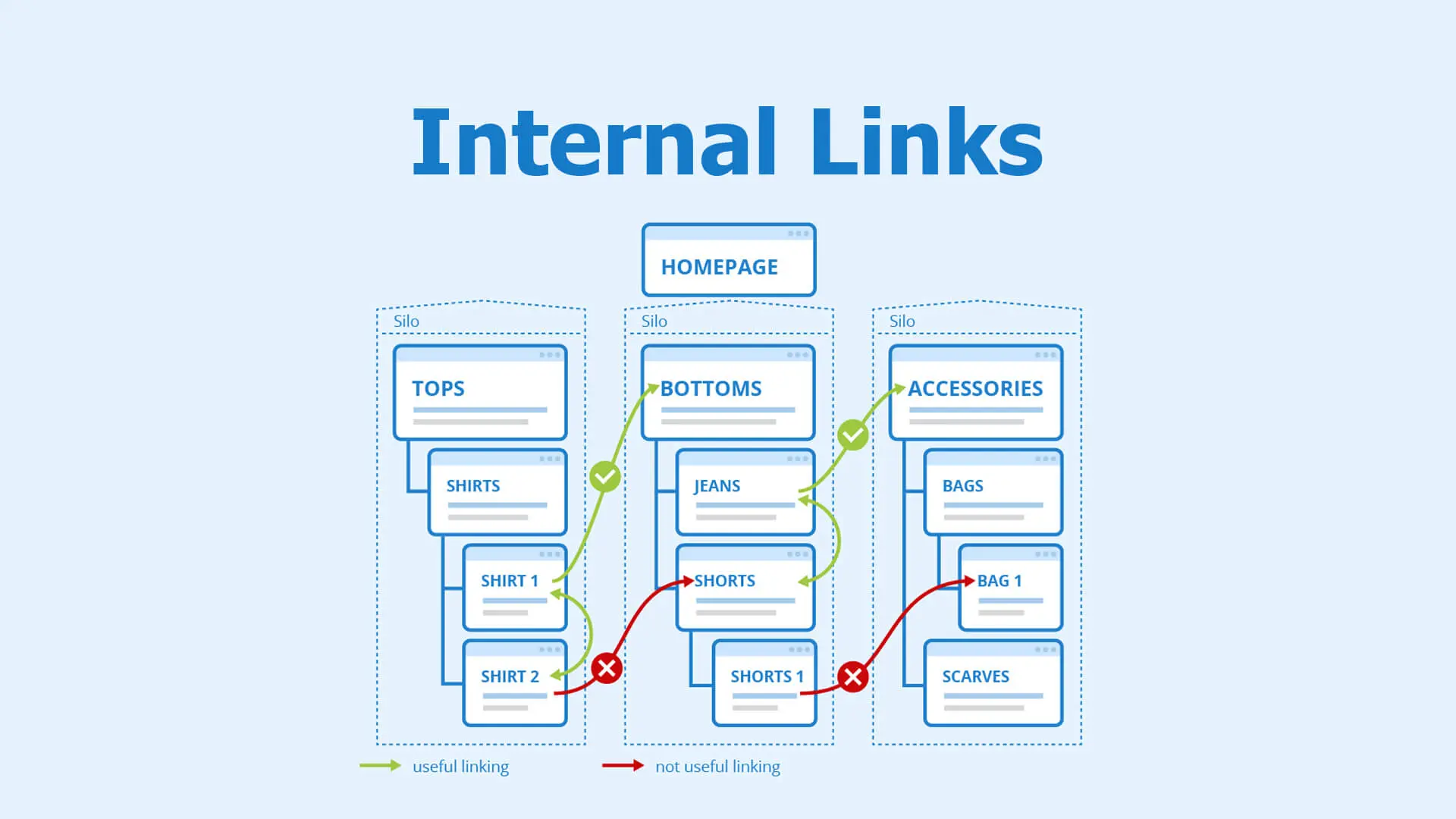
Ask most small business owners about internal linking and you'll get a blank look — it's one of the least understood, most overlooked parts of SEO, and also one of the cheapest to fix. Internal linking simply means linking from one page on your site to another relevant one. Done well, it guides customers to the next step, helps Google understand what matters most on your site, and quietly lifts the pages that need it. Done badly — or not at all — your best content sits isolated with nothing pointing to it.
Why internal linking actually matters
Every link on your site does two jobs at once. For a visitor, it's a signpost to related, useful information — a Sunshine Coast landscaper's blog post about drought-tolerant gardens should link to their irrigation installation service, because a reader interested in one is often interested in the other. For Google, internal links are how "authority" flows around your site — a well-linked page signals importance, while a page with no internal links pointing to it (an orphan page) can struggle to be found or ranked at all.
Link from your strongest pages to your most important ones
Not all pages carry equal weight. Your homepage and your best-performing blog posts usually have the most authority and traffic. Use that to your advantage: link from those high-traffic pages down to the service or product pages that actually make you money. A Bunbury physio's popular "how to recover from a hamstring strain" post, for instance, should link clearly to their sports injury rehab service page — not just once in passing, but with a genuine, natural call to action.
Use descriptive anchor text
The clickable words in a link — the anchor text — should describe what the reader will find, not say "click here" or "read more". Compare:
- Weak: "For more information, click here."
- Strong: "Our technical SEO checklist covers this in detail."
Descriptive anchor text helps visitors decide whether to click, and it gives Google useful context about what the linked page is about.
Link between related content, not just up and down
Internal linking isn't only about linking blog posts to service pages. Link sideways too, between genuinely related pieces of content. This guide, for example, naturally connects to our keyword research guide and what is topical authority articles, because all three sit within the same broader SEO topic. That web of connections is exactly what helps a site build depth on a subject.
Build topic clusters deliberately
The most effective internal linking strategy groups related content into clusters: one comprehensive "pillar" page on a broad topic, supported by several more specific posts that each link back to the pillar and to each other. A Toowoomba vet clinic might build a pillar page on "puppy care", supported by posts on vaccination schedules, toilet training and choosing the right food — each linking back to the main puppy care page and sideways to each other where relevant. This structure is a major contributor to topical authority, and it maps naturally onto how customers actually research a decision.
Don't overdo it
More links isn't automatically better. A page crammed with twenty internal links loses focus, and Google gives diminishing weight to each additional link as the count grows. Aim for a handful of genuinely relevant links per page — enough to guide the reader, not so many that nothing stands out.
Check for and fix orphan pages
An orphan page has no internal links pointing to it at all, which makes it hard for visitors to stumble across and hard for Google to find and rank. Periodically review your site (a full site crawl tool makes this easy) to check that every important page has at least one link pointing to it from somewhere else on the site.
Keep links working when you restructure your site
Whenever you rename a page, remove old content or restructure your navigation, check for broken internal links pointing to the old address. A site full of dead internal links looks unprofessional to visitors and wastes crawl effort for search engines. If you must move or remove a page, set up a proper redirect rather than leaving a dead end.
Internal linking checklist
- Identify your highest-authority pages (homepage, top blog posts) and link down to key service pages from them.
- Use descriptive, natural anchor text — never "click here".
- Link sideways between genuinely related content, not just top-down.
- Group related content into topic clusters with a clear pillar page.
- Keep the number of links per page reasonable and relevant.
- Check regularly for orphan pages with no internal links.
- Fix broken internal links whenever you restructure or remove pages.
Internal linking do's and don'ts
| Do | Don't |
|---|---|
| Use descriptive anchor text | Use "click here" or "read more" |
| Link to genuinely related content | Link randomly just to add more links |
| Build topic clusters around pillar pages | Leave popular posts with no links to service pages |
| Check for orphan pages regularly | Assume every page is being found |
| Fix links after restructuring the site | Leave broken links after a redesign |
Key Takeaways
- Internal links help both visitors and Google navigate and understand your site.
- Descriptive anchor text beats generic "click here" every time.
- Link from your strongest, highest-traffic pages down to your money-making pages.
- Build topic clusters with a pillar page and supporting posts linking to each other.
- Check regularly for orphan pages and broken links, especially after a site update.
Frequently Asked Questions
How many internal links should a page have?
There's no fixed number, but a handful of genuinely relevant links usually works better than a long list. Focus on quality and relevance over quantity.
What's the difference between internal and external links?
Internal links point to other pages on your own website; external links point to other websites entirely. Both matter for SEO, but internal linking is fully within your control and often the easier win.
Does internal linking really affect rankings?
Yes. It helps search engines understand which pages on your site are most important and how your content relates, and it's specifically discussed in Google's own Search Central documentation on site structure.
What is an orphan page?
An orphan page is one with no internal links pointing to it from anywhere else on your site, which makes it hard for visitors and search engines to discover, even if the page itself is otherwise well written.
Should I link to the same page more than once from one piece of content?
Generally no — one clear, well-placed link to a given page per piece of content is usually enough. Repeating the same link multiple times in one article rarely adds value.
Can too much internal linking hurt my SEO?
Excessive linking dilutes the value of each link and can make content feel cluttered and hard to read. Keep it purposeful rather than maximised.
How does internal linking relate to topical authority?
Internal linking is one of the main ways you demonstrate topical authority — connecting a pillar page to well-linked supporting content shows search engines (and readers) that you've covered a subject thoroughly, not just superficially.
Do I need to update internal links after a website redesign?
Yes, always. Check every internal link still points to a valid page after a redesign or content restructure, and set up redirects for anything that's moved or been removed.
Connect your content properly
A well-linked website helps customers find what they need and helps Google recognise your best work. If you'd like a full internal linking review for your site, have a chat with Pixel and Pine — we'll map it out properly.


