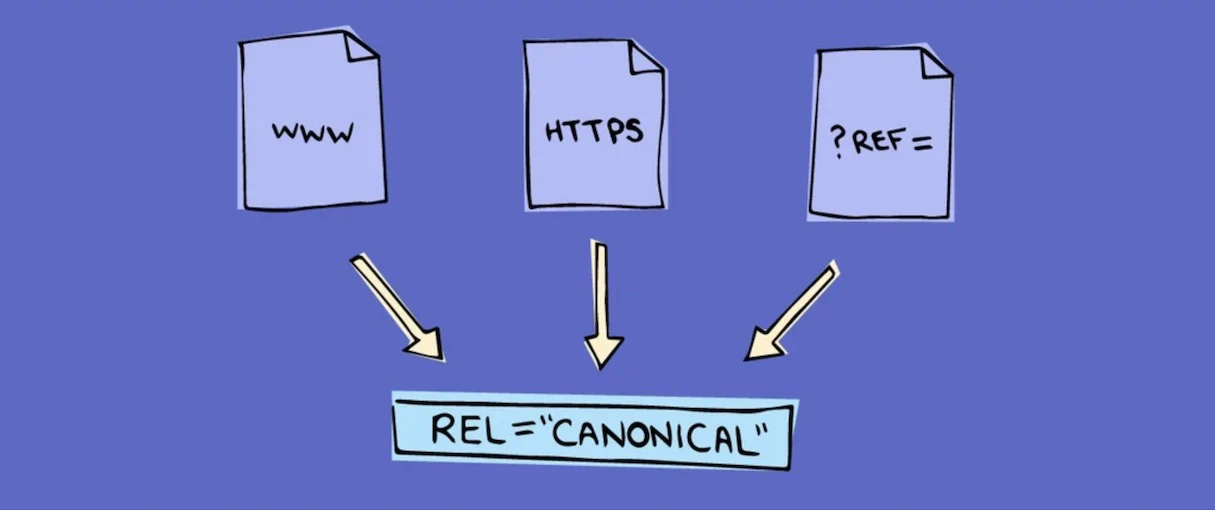
If you've ever seen "duplicate, Google chose different canonical than user" in Google Search Console, you've bumped into one of the most common, most misunderstood technical SEO issues. Canonical tags sound complicated, but the idea is simple: they tell search engines which version of a page is the real one, so your rankings don't get split across near-identical URLs. Here's what canonical tags actually do, why they matter for Australian small business websites, and how to get them right.
What a canonical tag actually is
A canonical tag is a small piece of code in the <head> of a web page that points to the "master" version of that page's content. It looks like this:
<link rel="canonical" href="https://example.com.au/product/blue-widget/" />
When Google crawls a page and finds this tag, it's being told: "This content might exist at other URLs too, but this is the version I want indexed and ranked." Every page on your site can carry a canonical tag — often it simply points to itself, which is normal and healthy. It only becomes interesting when several different URLs show the same, or very similar, content.
The duplicate content problem it solves
Search engines want to show one good result per query, not five near-identical versions of the same page. When Google finds multiple URLs with duplicate content, it has to guess which one to treat as authoritative — and that guess doesn't always match what you'd choose. Meanwhile, the ranking signals your page earns get spread thinly across the duplicates instead of concentrated on one strong page.
This happens more often than most business owners realise, usually by accident. Common causes include:
- www vs non-www versions of the same domain both being accessible.
- http vs https both resolving without a redirect.
- URL parameters from sorting, filtering or tracking codes (
?sort=price,?utm_source=...). - Printer-friendly or "view as PDF" versions of a page.
- Category and tag pages in WordPress that pull in the same posts as other archive pages.
- Product pages reachable through multiple category paths in an online store.
None of these are "wrong" for a user — a shopper doesn't care which category led them to a product. But to a search engine, each unique URL is a separate page, and that's exactly what canonical tags are designed to consolidate.
A real example: the Gold Coast homewares store
Picture a Gold Coast homewares eCommerce store selling a ceramic table lamp. A shopper can reach the same product page three different ways: through the "Lighting" category, the "New Arrivals" filter, and a "Under $100" price filter. Each path generates its own URL:
/lighting/ceramic-table-lamp//new-arrivals/ceramic-table-lamp/?filter=new/lighting/ceramic-table-lamp/?price=under-100
Without canonical tags, Google may index all three as separate pages competing against each other, none building enough authority to rank well. With a canonical tag on each variant pointing back to the primary URL, all the ranking value consolidates onto one strong page instead of being diluted across three weak ones — invisible to shoppers, but quietly costing the business rankings.
How canonical tags differ from redirects
It's worth being clear on the difference, because people often reach for the wrong tool.
| Duplicate content scenario | Right fix |
|---|---|
| Same page reachable via www and non-www | 301 redirect to one version |
| Same page reachable via http and https | 301 redirect to https |
| Product shown under multiple category filters | Canonical tag pointing to the primary URL |
| Printer-friendly version of an article | Canonical tag pointing to the original article |
| Paginated blog archive pages (page 2, 3...) | Self-referencing canonical, each page canonical to itself |
| Same content deliberately duplicated on two domains | 301 redirect or canonical, depending on which domain should rank |
A redirect sends users and search engines to a different URL — the old one stops existing. A canonical tag leaves both URLs live, but tells search engines which one to treat as the "real" one for ranking. Use redirects when a URL should genuinely disappear; use canonical tags when multiple live URLs need to exist but ranking credit should flow to one.
Setting canonical tags in WordPress, Shopify and WooCommerce
If your site runs on WordPress, you almost never need to write canonical tags by hand. Yoast SEO and Rank Math automatically add a self-referencing canonical tag to every page, and both let you override it manually when needed — worth checking as part of a broader technical SEO checklist. The main trouble spots are category and tag archives, and URL parameters from WooCommerce filter plugins — check that filtered URLs (colour, size, price) carry a canonical back to the unfiltered category page.
Shopify handles much of this automatically too. Products appearing under multiple collections are canonicalised to the primary URL by default, and Shopify manages most www/https consistency out of the box. Apps that add filtering or tracking parameters can still create duplicate URLs though, so spot-check filtered pages on a large catalogue. The principle holds regardless of platform — one clear, consistent signal about which URL should rank.
Checking your canonical tags
You don't need special tools. Two simple methods:
- View page source. Right-click any page, choose "View Page Source," and search for
rel="canonical"in the<head>. Confirm it points where you'd expect. - Google Search Console's URL Inspection tool. Paste in a URL and it shows you the "Google-selected canonical" — which may differ from the one you declared, often because of weak internal linking to your preferred version.
If Google's selected canonical doesn't match yours, that's worth investigating rather than ignoring — it usually points to internal linking, sitemap or content issues. Our guide to Google Search Console covers how to read these reports properly.
Common canonical tag mistakes
| Mistake | Why it hurts | How to avoid it |
|---|---|---|
| Canonical points to a redirected or deleted URL | Wastes the signal, confuses crawlers | Regularly audit canonical targets return a 200 status |
| Every page canonicalised to the homepage | Tells Google none of your other pages matter | Use self-referencing canonicals by default |
| Canonical tag conflicts with the XML sitemap | Sends mixed signals about the preferred URL | Keep sitemap URLs and canonical URLs consistent |
| Paginated pages all canonicalised to page 1 | Can hide legitimate content on later pages from indexing | Self-canonicalise each paginated page |
| Missing canonical on parameter URLs | Lets filters and tracking codes create duplicate content | Add canonicals pointing to the clean base URL |
These mistakes are easy to make and easy to miss, which is why canonical tags belong on the checklist for any website redesign or migration — a common point where sites lose rankings built up over years.
Key Takeaways
- A canonical tag tells search engines which URL is the "master" version when similar content exists at more than one address.
- Duplicate content splits ranking signals across multiple URLs instead of concentrating them on one strong page.
- Common causes include www/non-www, http/https, URL parameters from filtering, and products reachable through multiple categories.
- Use a redirect when a URL should disappear entirely; use a canonical tag when multiple live URLs need to exist but should rank as one.
- Yoast SEO and Rank Math handle canonical tags automatically on WordPress; Shopify does much of the same for products.
- Search Console's URL Inspection tool shows the "Google-selected canonical," which can reveal mismatches worth fixing.
Frequently Asked Questions
What happens if I don't use canonical tags at all?
Nothing breaks immediately, but sites with real duplicate content — especially large eCommerce catalogues — risk having ranking signals spread across near-identical pages instead of consolidated onto one strong version. Google will still guess which page to rank, and that guess won't always match the page you'd prefer.
Can I have too many canonical tags on my site?
No — every page should have one, and in most cases it simply points to itself. That's normal and not something to fix. The issue only arises when canonical tags are missing on genuine duplicates, or pointing somewhere incorrect.
Do canonical tags guarantee Google will follow them?
No. It's a strong signal, not a directive Google must obey. Google Search Central describes it as a hint that Google usually respects, but it can choose a different "Google-selected canonical" if other signals — like internal links or the sitemap — point elsewhere.
Is a canonical tag the same as a 301 redirect?
No. A redirect sends visitors and search engines to a different URL, and the original stops being reachable. A canonical tag leaves all versions live, while telling search engines which one is authoritative for ranking. Use redirects for URLs that should disappear, and canonicals for URLs that need to coexist.
Do I need to add canonical tags manually if I use WordPress?
Usually not. Yoast SEO and Rank Math add a sensible default canonical tag to every page automatically, with a field to override it manually when needed. You mainly need to check they're configured correctly, rather than writing tags by hand.
How do cross-domain canonical tags work?
A canonical tag can point to a URL on an entirely different domain, useful when the same content is deliberately published in two places — a press release also hosted on a partner's site, for example. It tells search engines which domain should get credit for ranking, provided both sites agree.
Will fixing canonical tags improve my rankings straight away?
Rarely overnight, but consolidating duplicate content onto one canonical URL is a foundational technical SEO improvement that compounds over time. Think of it as removing friction working against your other SEO efforts, not a standalone ranking booster.
Do canonical tags affect Google Ads or paid traffic?
No, canonical tags only influence organic indexing and ranking. Paid traffic through Google Ads goes directly to the URL in your ad regardless. If you're weighing up where to invest your marketing budget, our comparison of SEO vs Google Ads covers how the two channels work together.
Get your technical SEO sorted properly
Canonical tags are a small piece of code with an outsized effect on how your rankings consolidate — but they're only one part of a healthy technical SEO foundation, alongside a clean XML sitemap. If you're not sure whether duplicate content is quietly costing your business rankings, have a chat with Pixel and Pine. We'll audit your canonical tags, sitemap and indexing signals, and fix what's holding your pages back.


