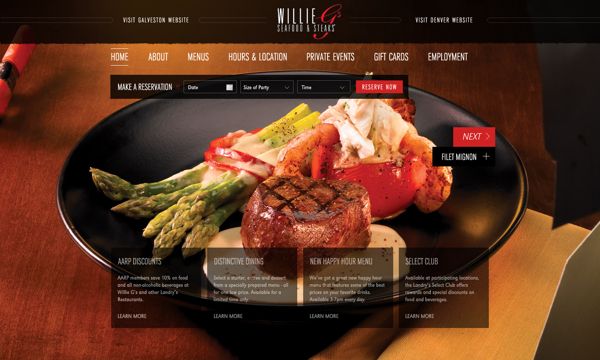
Someone standing outside a restaurant in Fitzroy, phone in hand, deciding whether to walk in or keep looking, will give your website about ten seconds. In that time they want the menu, a photo that makes them hungry, tonight's opening hours and a way to book — not a slow hero video and a "read our story" button. Restaurant website design is a different job to a normal small business site, because the decision it supports happens fast, on a phone, usually while someone is already hungry.
What diners actually check before they book or walk in
Before booking or visiting, most people run through the same mental checklist. Get any of these wrong or bury them and the booking goes to the restaurant next door with a clearer site.
- The menu — dishes, and ideally prices, without downloading anything.
- Photos of the food, not just the dining room.
- Today's opening hours, not "Mon–Sun" buried in a footer.
- Location and parking — is it walkable, is there parking, which tram or train stop.
- A way to book without ringing during service.
Lead your homepage with these practical facts. Save the "our story" section for once they're already interested.
The menu is the most important page on your site
For a restaurant, the menu is the product page, so treat it that way. The biggest mistake we see is a menu that only exists as a PDF. PDFs are slow on mobile, invisible to Google search, and easy to forget to update — a PDF from eighteen months ago with a retired dish or old prices damages trust the moment someone notices.
Build your menu as real web pages instead:
- Clear sections (starters, mains, desserts, drinks) with short descriptions.
- Prices kept current.
- Allergen and dietary tags (gluten-free, vegan, nut-free, dairy-free) on each dish.
- A downloadable PDF as a backup, not the only version.
Make booking a table effortless
Every extra step between "I want to eat here" and a confirmed booking loses a percentage of interested people. If booking means calling during dinner service and getting a busy signal, plenty will simply try somewhere else.
Integrate a proper online booking system and put the button somewhere it can't be missed — in the main navigation, and repeated on mobile. Converting interest into a confirmed booking without friction is arguably a restaurant site's number one job, even ahead of the menu. If you also welcome walk-ins, say so.
Photography that actually sells the food
Food is the product, and people eat with their eyes first. Genuine, well-lit photos of your actual dishes sell harder than any paragraph of description. Stock photography of generic pasta is an instant giveaway that a site was thrown together cheaply, and diners notice.
A handful of good, real photos beats dozens of mediocre ones — prioritise signature dishes, the dining room, and any distinctive touches like an open kitchen or terrace. Keep the images properly compressed; oversized photos are one of the most common reasons restaurant sites feel sluggish on mobile data, which our how fast should a website load guide covers in practical detail.
Connect your delivery and ordering platforms
If you offer delivery or takeaway, make it obvious and one click away. Link directly to your Uber Eats, Menulog or DoorDash listings, ideally as clear buttons rather than a line in the footer. Someone who wants delivery tonight shouldn't have to search a third-party app to find you when they were already on your site. If you run your own ordering system, give "Order Online" the same prominence as "Book a Table" — the two actions most visitors actually came to take.
Design for the phone in someone's hand
Most people looking for somewhere to eat tonight are doing it on a phone, often while deciding nearby. A restaurant site that isn't genuinely mobile-first — fast, easy to tap, menu and booking button reachable without pinching and zooming — is fighting its own core audience.
Mobile-first means designing the small screen first, not squeezing a desktop layout down until it technically fits. Big legible menu text, thumb-sized buttons, and a booking button that stays visible while scrolling separate a site that converts from one that merely looks fine in a demo. Our small business website checklist is a useful gut-check for a rebuild.
Local SEO: get found when Fitzroy searches for dinner
A restaurant lives or dies on local search. Someone typing "restaurant near me" or "best pasta in Fitzroy" needs to find you — a different fight to ranking nationally.
Start with your Google Business Profile, the single highest-leverage thing a restaurant can do for local visibility. Keep hours, menu link, phone number and photos current, and respond to reviews. A profile with outdated hours sends people the wrong information on the exact night they decide to visit.
On the website itself, mention your suburb and nearby landmarks naturally — "a short walk from Brunswick Street" or "opposite the Fitzroy Town Hall" — which helps both Google and real people confirm they've found the right place. Embed a Google Maps location for one-tap directions, and make your phone number a click-to-call link. These details matter more for hospitality than most industries, since so much restaurant traffic is "right now, nearby" searches — a point our why your business needs a professional website guide explores more broadly.
Trust signals that seal the booking
Choosing a restaurant is a small risk. Trust signals reduce that risk before someone walks in:
- Reviews from Google and TripAdvisor, linked or genuinely quoted rather than vaguely claimed.
- Real photos, not stock imagery — diners can tell the difference.
- Chef or owner bios that give the place a face, once the practical details are covered.
- Press mentions or awards, shown simply rather than buried.
- Visible food safety or hygiene ratings, where relevant, for anyone checking before trying somewhere new.
Common mistakes restaurant websites make
We see the same problems repeatedly on hospitality sites:
- Menus and hours months out of date, or a menu only available as a PDF.
- No mobile optimisation on the device most diners actually use.
- A booking option that's hidden, or only a phone number during service hours.
- Slow-loading pages weighed down by unoptimised, oversized photos.
- No link to delivery platforms, despite offering delivery.
- Generic stock photography instead of real food and dining room shots.
Any one costs bookings; several lose custom to a competitor without you knowing.
What a restaurant website must do
| Feature | Why it matters | Common mistake |
|---|---|---|
| Live, web-based menu | Diners decide what to order before they decide to book | Menu only exists as a PDF |
| Online table booking | Removes the friction of calling during service | Booking button hidden or missing |
| Real food photography | People eat with their eyes first | Generic stock photos of unrelated food |
| Mobile-first layout | Most searches happen on a phone, often nearby | Desktop layout squeezed onto small screens |
| Delivery platform links | Captures people who want it delivered, not dine-in | No link to Uber Eats, Menulog or DoorDash |
| Google Maps + click-to-call | One-tap directions and calling from mobile | Address as plain text, no map or tappable number |
| Current opening hours | Wrong hours send people away on the night that matters | Hours not updated for public holidays |
| Reviews and real trust signals | Reduces the risk of trying somewhere new | No reviews shown, or fake-looking testimonials |
Key Takeaways
- Lead with what diners need fast: menu, photos, hours, location and a way to book.
- Never rely on a PDF-only menu — build it as real, current web pages with dietary tags.
- Make booking (and ordering, if you deliver) a one-tap action, not a phone call during service.
- Design mobile-first, since most restaurant searches happen on a phone.
- Local SEO, especially your Google Business Profile, drives most "near me" restaurant traffic.
- Real photos and real reviews build more trust than polished copy ever will.
Frequently Asked Questions
Do I really need online booking on my restaurant website?
Yes, if you take reservations at all. A visible booking option removes the biggest friction between liking your restaurant and confirming a table, and captures people browsing outside your calling hours.
Should I use a PDF for my menu?
Not as your only version. PDFs are slow on mobile, don't rank in search, and get forgotten when prices or dishes change. Build your menu as web pages and offer a PDF as a backup only.
How important are food photos on a restaurant website?
Very. Genuine photos of your dishes are one of the strongest reasons people book, while stock photography is easy to spot and undermines trust. A handful of well-lit, real photos beats a large gallery of average ones.
What's the single biggest local SEO factor for restaurants?
Your Google Business Profile. Keeping hours, menu, photos and reviews current there has more impact on "restaurant near me" searches than almost anything else, since it's what Google shows first locally.
Should my restaurant website link to Uber Eats, Menulog or DoorDash?
Yes, if you offer delivery through them. Make the links clear rather than buried in the footer, so someone wanting delivery tonight doesn't have to search a third-party app to find you.
How mobile-friendly does a restaurant site need to be?
Very. Most people searching for somewhere to eat are on their phone, often nearby. That means fast-loading pages, legible menu text without zooming, and a booking button that stays reachable while scrolling.
What trust signals matter most for a restaurant?
Genuine Google and TripAdvisor reviews, real photography instead of stock images, and, where relevant, visible food safety ratings or press mentions. These reduce the risk every diner feels trying somewhere new.
How do I choose a web designer who understands restaurants?
Look for a designer who asks about your menu structure, booking system, delivery platforms and local search strategy, rather than offering a generic template. Our how to choose a web design agency guide covers the questions worth asking first.
Get a restaurant website that fills tables
A great restaurant deserves a website that matches it — fast, mobile-friendly, easy to book from, and built around what hungry people actually need to see. If your current site is working against you rather than for you, have a chat with Pixel and Pine. We design restaurant websites for Australian venues that turn phone searches into booked tables.


