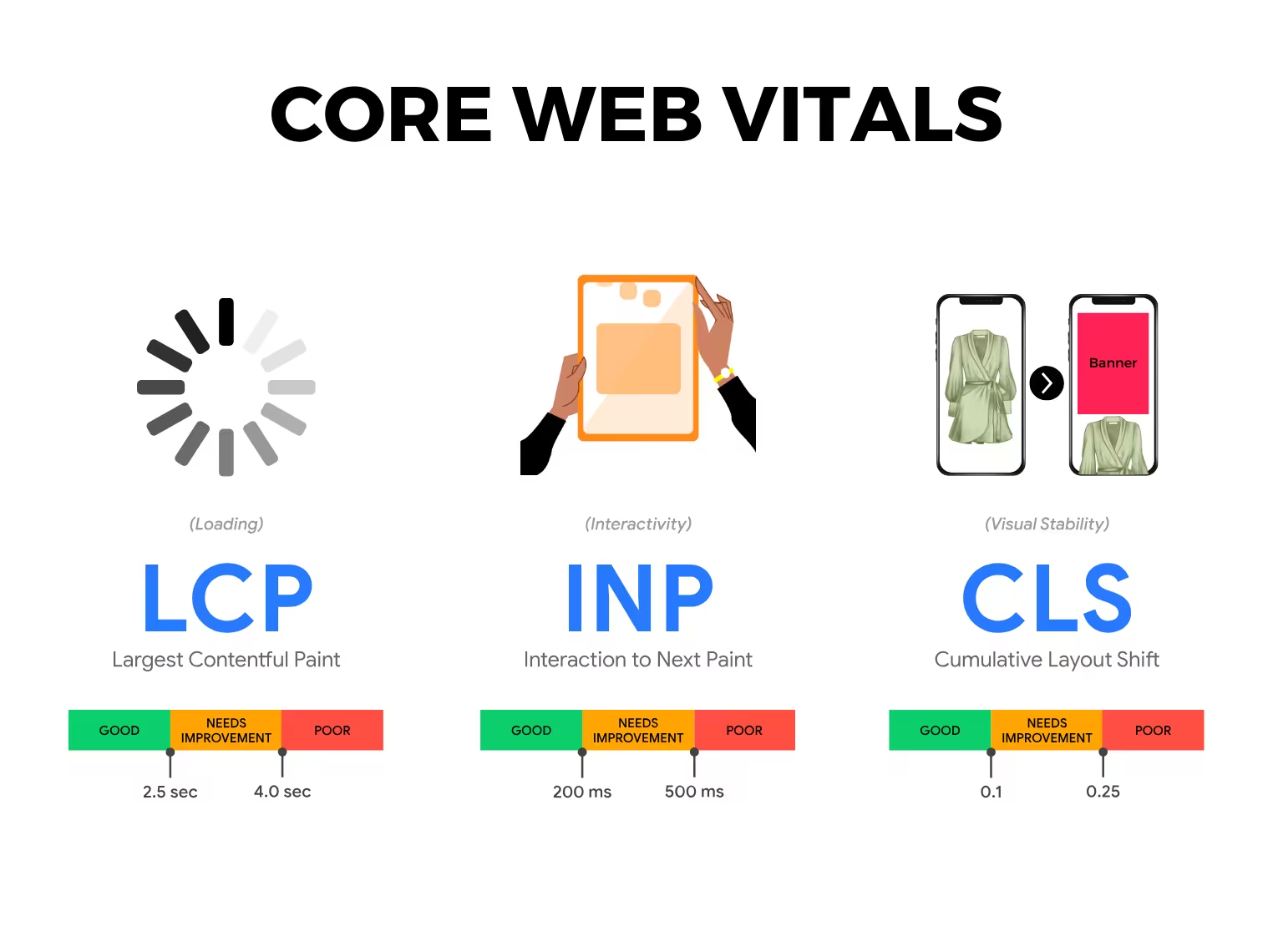
Google's core web vitals are three real-world measurements that grade how fast your pages load, how quickly they respond to taps and clicks, and how stable they feel while loading. They matter because Google uses them as a ranking signal, and because visitors quietly judge your business by how a site feels. This guide explains each metric in plain English, gives you the thresholds that count as "good", and shows you how to measure and improve them.
What are core web vitals?
Core web vitals are a small set of performance metrics that Google chose to represent the parts of the user experience that people notice most. Rather than drowning you in dozens of technical numbers, Google narrowed it down to three: loading, responsiveness, and visual stability. Each one maps to a frustration we all recognise — a page that takes ages to show its main content, a button that ignores your tap, or a layout that jumps just as you go to click.
The three metrics are Largest Contentful Paint (LCP), Interaction to Next Paint (INP), and Cumulative Layout Shift (CLS). INP officially replaced an older metric called First Input Delay (FID) in March 2024, so if you read older articles mentioning FID, INP is now the responsiveness metric that counts.
Here are the "good" thresholds at a glance:
| Metric | What it measures | "Good" threshold |
|---|---|---|
| LCP (Largest Contentful Paint) | Loading speed | 2.5 seconds or less |
| INP (Interaction to Next Paint) | Responsiveness | 200 milliseconds or less |
| CLS (Cumulative Layout Shift) | Visual stability | 0.1 or less |
For each metric, Google sorts pages into three bands: "good", "needs improvement", and "poor". Anything past the good threshold drops into needs improvement, and pages well beyond that fall into poor. The aim is simple — get all three into the good band for most of your visitors.
Largest Contentful Paint (LCP)
LCP measures how long it takes for the biggest visible element on screen to load. That's usually a hero image, a banner, a video poster frame, or a large block of text. In other words, it's a good proxy for "how long until the page looks ready". A good LCP is 2.5 seconds or less; beyond roughly four seconds it slips into the poor band.
Common causes of slow LCP include oversized or uncompressed images, slow server response times, render-blocking CSS and JavaScript, and hosting that's physically far from your audience. If your servers sit overseas while your customers are in Australia, every request has further to travel.
Fixes that tend to help most:
- Compress and resize images, and serve modern formats like WebP or AVIF.
- Use a content delivery network (CDN) so files load from a server near the visitor.
- Improve your hosting and server response time — our guide to the best web hosting in Australia walks through what to look for.
- Remove or defer scripts and styles that block the page from rendering.
- Preload the hero image so the browser fetches it early.
Interaction to Next Paint (INP)
INP measures responsiveness — specifically, how quickly the page reacts visually after a user interacts with it, such as tapping a menu, clicking a button, or typing in a field. It looks across all the interactions during a visit and reports a value that reflects the slowest, most noticeable lags. A good INP is 200 milliseconds or less; once you push past 500 milliseconds, you're in poor territory and people feel the lag.
The usual culprit behind a poor INP is JavaScript. When the browser is busy running heavy scripts, it can't respond to the user straight away, so taps feel sluggish. Bloated third-party tools — chat widgets, trackers, pop-up builders, and analytics tags — are frequent offenders.
To improve INP:
- Audit and remove third-party scripts you don't genuinely need.
- Break long JavaScript tasks into smaller chunks so the browser can respond between them.
- Defer non-essential code until after the page is interactive.
- Keep your codebase lean rather than loading an entire framework for a simple page.
Cumulative Layout Shift (CLS)
CLS measures visual stability — how much the page jumps around as it loads. You've felt this when you go to tap a link and an ad or image suddenly loads above it, shoving everything down so you tap the wrong thing. CLS is scored as a ratio rather than a time, and a good CLS is 0.1 or less; above 0.25 is poor.
Common causes include images and embeds without set dimensions, ads or banners injected after load, web fonts that swap and reflow the text, and content inserted dynamically above what's already on screen.
To reduce CLS:
- Always set width and height attributes (or reserve space) for images, videos, and iframes.
- Reserve fixed space for ads, banners, and embeds before they load.
- Load fonts carefully so they don't cause a jarring reflow when they swap in.
- Avoid inserting new content above existing content unless it's in response to a user action.
How to measure your core web vitals
You don't need to guess. Several free Google tools report your core web vitals, and it helps to understand the difference between two kinds of data.
Field data (also called real-user data) comes from actual Chrome visitors over the previous 28 days. It's the data Google uses for ranking, because it reflects real devices and connections — including the older phones and patchy mobile signal many of your customers are on. Lab data is a single simulated test run in a controlled environment. Lab data is brilliant for diagnosing and debugging because it's repeatable, but field data is what ultimately counts.
Here's where to look:
- PageSpeed Insights (pagespeed.web.dev) — paste in any URL and you'll get both field and lab data, plus a prioritised list of opportunities. The best starting point for most business owners.
- Google Search Console — the Core Web Vitals report groups your whole site's URLs into good, needs improvement, and poor, using field data. Ideal for spotting site-wide patterns rather than one page at a time.
- Lighthouse — built into Chrome's developer tools, it runs a lab test on demand and is great for testing changes before they go live.
Test on both mobile and desktop, since Google evaluates them separately and mobile scores are usually the harder ones to win.
Why core web vitals matter for SEO and conversions
There are two reasons to care. The first is search rankings: core web vitals are part of Google's page experience signals, so a fast, stable site has an edge — especially where you and a competitor are otherwise evenly matched. Performance won't outrank genuinely better content, but it can be the tiebreaker.
The second reason is the more profitable one: conversions. Slow, janky pages drive people away before they ever read your offer. Every extra second of load time gives a hesitant visitor another reason to hit the back button, and a layout that jumps around erodes trust. Improving these scores tends to lift enquiries, sales, and time on site — which is the whole point. If you're weighing where to spend your marketing budget, it's worth reading our take on SEO vs Google Ads alongside this, because a faster site improves the return on both. And if you're already planning bigger changes, fold performance into your website redesign checklist rather than treating it as an afterthought.
Frequently Asked Questions
How often are core web vitals updated?
The field data in tools like Search Console and PageSpeed Insights is based on a rolling 28-day window, so changes you make won't show up overnight. Expect to wait a few weeks after a fix before the real-user numbers fully reflect it. Lab tools like Lighthouse, on the other hand, update the moment you re-run them.
Do core web vitals affect my Google ranking?
Yes, but in proportion. They're one of several page experience signals, not the dominant factor — relevant, helpful content still comes first. Think of strong core web vitals as removing a handbrake rather than as a turbo boost: they help you compete, especially on mobile and against similar competitors.
What's a good page load time to aim for?
The headline target is an LCP of 2.5 seconds or less, but overall load time matters for the experience too. We dig into sensible benchmarks in how fast should a website load, which pairs well with the thresholds in this guide.
Can I pass core web vitals on a website builder like WordPress or Wix?
Often, yes — but it takes care. Page builders and heavy themes can pile on scripts and unoptimised images that hurt INP and LCP. With good hosting, optimised images, a tidy theme, and disciplined use of plugins, most platforms can reach the good band. Sometimes a lean custom build is the cleaner answer.
Let's get your scores into the green
Chasing core web vitals can feel fiddly, but you don't have to do it alone. If your pages are loading slowly, jumping around, or simply not converting the way they should, we can run a full audit and tell you exactly what to fix first. Talk to Pixel and Pine and we'll help you turn a sluggish site into a fast, dependable one your customers actually enjoy using.