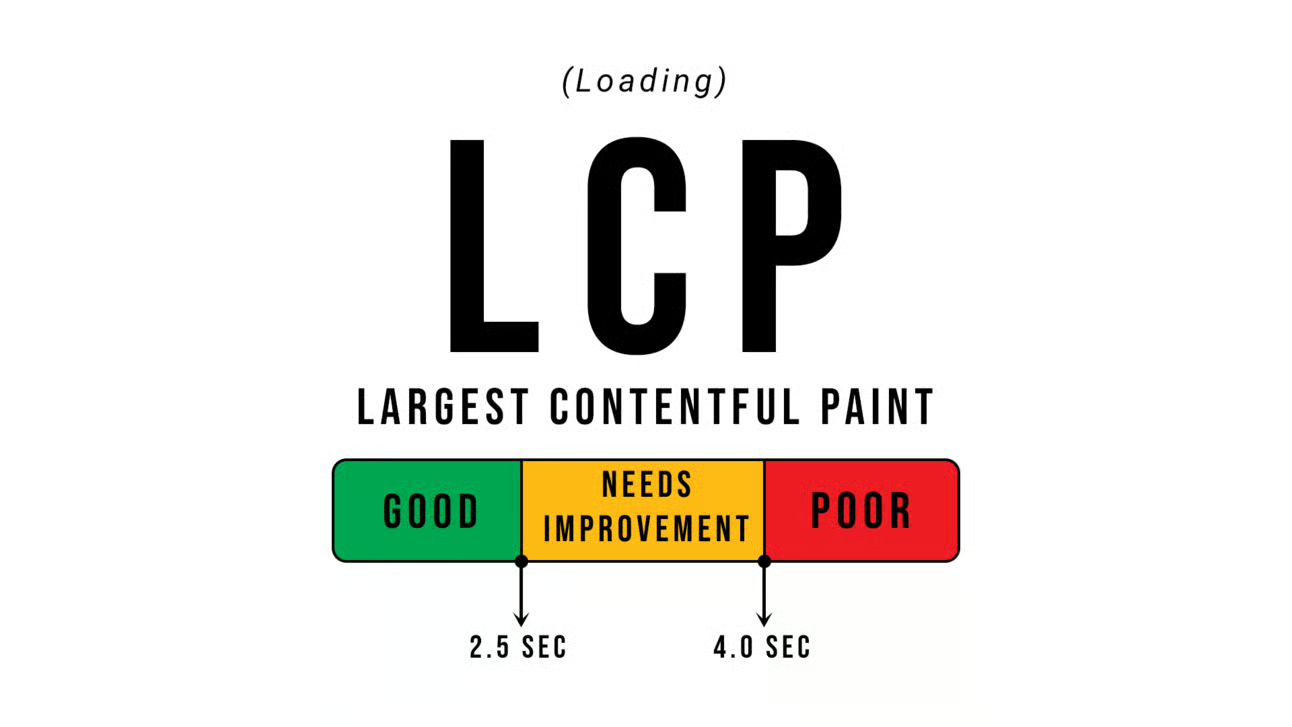
If you've run your website through Google PageSpeed Insights and seen a red or orange score next to "Largest Contentful Paint", you've probably wondered what it means and whether it's worth worrying about. It is. LCP is one of Google's three Core Web Vitals, and it measures something simple: how long a visitor stares at a mostly blank page before the main thing they came to see actually shows up. Get it wrong and people leave before they've even read your headline.
What Is Largest Contentful Paint, Exactly?
Largest Contentful Paint measures the time it takes for the biggest visible element on a page to fully render, from the moment someone clicks a link or types your web address. On most business homepages, that "largest element" is a hero image, a big heading, or a banner across the top of the page. On a product page it's often the main product photo.
It isn't measuring when the page starts loading, or when every script and tracking pixel finishes in the background. It's measuring the moment the visual content a visitor cares about is on screen and readable — a far better proxy for real user experience than older, technical metrics. LCP sits alongside visual stability and responsiveness to clicks and taps as one of Google's three Core Web Vitals; see our Core Web Vitals guide for the full picture.
Why LCP Matters for Your Business
Two things ride on your LCP score: how visitors feel about your site, and how Google ranks it.
On the human side, a slow LCP means visitors stare at an empty or half-loaded page. People on their phones, often with patchy reception, don't wait around — if your hero image takes several seconds to appear, plenty bounce back to Google before seeing what you offer. That's an enquiry lost before your business gets a chance to make its case, which is exactly why slow websites lose customers.
On the ranking side, Google has confirmed Core Web Vitals, including LCP, form part of how it evaluates page experience in search. It won't fix a site with weak content or poor SEO, but between two similar competitors, the faster one has a real edge — and if you're already spending on Google Ads, a slow LCP quietly undermines that spend.
What Counts as Good, Needs Improvement, or Poor LCP
Google publishes clear guidance here, so it's worth knowing the actual figures rather than guessing:
- Good: LCP happens in 2.5 seconds or less.
- Needs improvement: LCP falls somewhere between that and roughly double.
- Poor: LCP takes more than 4 seconds.
Google measures this using real visitor data where traffic allows, and lab data (via PageSpeed Insights) otherwise. Both matter — lab data shows the technical cause, while field data shows what your actual visitors, on their actual phones, experience.
What Usually Causes Slow LCP on Small Business Sites
In our experience, slow LCP on Australian small business sites almost always comes down to the same handful of causes:
- Large, uncompressed hero images. A photo straight off a phone or DSLR, dropped into the homepage banner with no compression, is the single most common cause we see.
- Slow hosting or server response. If the server is slow to respond to the first request, everything downstream — including your hero image — is delayed before it starts loading.
- Render-blocking CSS and JavaScript. Stylesheets and scripts the browser must process before drawing anything push the whole page's rendering back.
- No preloading of the hero image. Browsers often discover the main image late, buried in CSS, when it could have been flagged as a priority from the first line of the page.
- Web fonts loading late. If your heading is the largest element and it's set in a custom font that hasn't arrived, the browser may delay showing it or swap it awkwardly.
- Heavy sliders and carousels. Homepage sliders often load several full-size images and extra JavaScript, all competing for bandwidth with the one image that needs to appear first.
A Ballarat Physio Clinic, in Practice
Picture a Ballarat physiotherapy clinic with a lovely new website. The homepage opens with a full-width photo of the treatment room — beautifully lit, but exported at full camera resolution with no compression. On the clinic's office Wi-Fi it looks fine; on a patient's phone on the train, it can take four or five seconds to appear. Meanwhile the clinic is paying for Google Ads on "physio near me", and a chunk of those clicks bounce before the page even paints. The fix isn't a redesign — it's resizing and compressing that one image.
Practical Fixes That Don't Require a Developer
You don't need to be technical to make real progress on LCP:
- Compress and correctly size every hero image. Export at the actual display size needed, not full camera resolution, and compress before uploading.
- Use modern image formats. WebP or AVIF produce smaller files than JPEG or PNG at similar quality, and most platforms now support them. Our image optimisation guide covers this in depth.
- Preload your key hero image. Flagging the main image as a priority, rather than letting the browser discover it naturally, can shave real time off LCP.
- Choose decent, fast hosting. Cheap, overcrowded shared hosting is a common hidden cause of slow server response, and one of the reasons cheap websites often cost more in the long run.
- Use a content delivery network (CDN). A CDN serves images and files from a location closer to each visitor, which matters across a country the size of Australia.
- Cut render-blocking CSS and JavaScript. Removing unused code and deferring anything unneeded for the first screen lets the browser start painting sooner, as our guide to render-blocking resources explains.
- Avoid heavy sliders and carousels. A single strong hero image with clear copy usually outperforms a slider, for both LCP and conversions.
- Load web fonts sensibly. Limit the font weights you use, and make sure text isn't invisible while fonts load.
Common LCP Causes and Their Fixes
| Common Cause | Practical Fix |
|---|---|
| Large, uncompressed hero image | Resize to display dimensions and compress before upload |
| Older image formats (JPEG/PNG only) | Convert key images to WebP or AVIF |
| Slow server response time | Move to better-quality, less crowded hosting |
| Images served from one distant location | Add a CDN to serve files closer to each visitor |
| Render-blocking CSS/JavaScript | Remove unused code and defer non-essential scripts |
| Hero image discovered late by the browser | Preload the hero image explicitly |
| Web fonts arriving late | Limit font weights and avoid invisible text while fonts load |
| Homepage image sliders/carousels | Replace with a single, optimised hero image |
How to Check Your Site's LCP Score
Google PageSpeed Insights is the easiest free tool for this. Enter your web address and it reports your LCP figure alongside the other Core Web Vitals, plus a plain-language list of what's slowing the page down.
Take a Cairns tour operator selling reef trips online. Their homepage might load nicely once optimised, but their booking page — with a calendar widget, testimonial carousel and multiple tour photos — could still be slow if nobody's checked it separately. Test every important page, and retest after every redesign, since one new hero image can undo months of good work.
Key Takeaways
- Largest Contentful Paint measures how long it takes for the biggest visible element on a page — usually a hero image or heading — to fully render.
- Google considers 2.5 seconds or less good, and anything over 4 seconds poor, using both lab and real-world visitor data.
- The most common cause on small business sites is an oversized, uncompressed hero image.
- Fixes are largely non-technical: compress images, use modern formats, choose solid hosting, add a CDN, preload the hero image, and skip heavy sliders.
- Test every important page in PageSpeed Insights, not just the homepage, and retest after redesigns.
Frequently Asked Questions
What is Largest Contentful Paint in simple terms?
It's the time it takes for the biggest thing a visitor can see on your page — usually a hero image, banner or main heading — to fully load and appear on screen. It reflects how quickly your page feels "loaded" from a real person's point of view.
Is Largest Contentful Paint a Google ranking factor?
Yes. LCP is one of Google's three Core Web Vitals, which Google has confirmed form part of how it assesses page experience in search. It won't outweigh strong content and SEO fundamentals, but between similar competing pages, a faster LCP is a genuine advantage.
What is a good LCP score?
Google considers an LCP of 2.5 seconds or less good. Between that and roughly double is "needs improvement", and anything beyond that is poor. Check your own score for free using Google PageSpeed Insights.
Why is my hero image causing a slow LCP score?
Most commonly it's simply too large a file — exported at full camera resolution and uploaded without compression or resizing. Browsers must download the whole file even when it displays smaller on screen, which costs real time on mobile connections.
Does slow hosting affect LCP?
Yes, significantly. If your server is slow to respond to the first request, every other resource on the page — including your hero image — is delayed before it even starts downloading. No amount of image compression fixes a genuinely slow host.
Should I remove my homepage image slider to improve LCP?
In most cases, yes. Sliders typically load several full-size images and extra JavaScript to animate between slides, and only one of those images matters for LCP. A single, well-chosen hero image usually loads faster and converts just as well.
Will fixing LCP fix my whole website's speed?
It's a major piece of the puzzle, but not the whole picture. LCP sits alongside the other Core Web Vitals and overall page weight, so treat speed as ongoing rather than a one-off fix — our broader guide on why website speed matters covers the full picture.
Get a Website That Loads Fast, Every Time
A slow-loading hero image is one of the easiest wins in website performance, and one of the most commonly ignored. If you'd like your site's Largest Contentful Paint properly reviewed and fixed, have a chat with Pixel and Pine. We'll show you exactly what's slowing your pages down and what it takes to fix it.


