You go to tap "Order Now" on a cafe's website and, at the last second, an image loads in above it and the whole page jumps. You end up tapping the wrong link instead. That jarring jump has a name — cumulative layout shift — and it's one of the three Core Web Vitals Google uses to judge whether your website gives people a decent experience. If your site fidgets while it loads, you're losing clicks, enquiries and trust without ever knowing why.
What Cumulative Layout Shift Actually Means
Cumulative layout shift, or CLS, measures how much the visible content on your page moves around unexpectedly while it's loading. Not scrolling that you control — sudden, uninvited shifts: a button drops down a few centimetres, a paragraph of text reflows, an image shoves everything below it further down the screen.
It's "cumulative" because it adds up every unexpected shift during a visit, not just the first one. A page that jumps when a font loads and again when an ad slides in scores worse than one that jumps only once.
The frustrating part is timing. These shifts almost always happen in the first second or two after a page starts rendering — exactly when an impatient visitor is trying to read a headline or tap a button.
Why Layout Shift Frustrates Customers and Costs You Business
Think about what layout shift actually does to a real visitor:
- Misclicks. They go to tap "Book Now" and instead tap an ad or a different link because the page moved a split second before their finger landed.
- Abandoned forms. A field jumps just as someone starts typing their phone number, and they give up rather than start again.
- Lost trust. A site that jitters and jumps feels unfinished or untrustworthy, even if the business behind it is completely legitimate.
- Wasted time. Visitors have to re-read a sentence or re-locate a button, which adds friction to every single page they visit.
None of this shows up as an error message. People don't complain about "cumulative layout shift" — they just get annoyed, tap the wrong thing, and quietly leave. It's exactly the kind of invisible problem covered in our guide to why website speed matters, and it's why Google folded CLS into its ranking signals alongside loading speed.
What Counts as a Good CLS Score
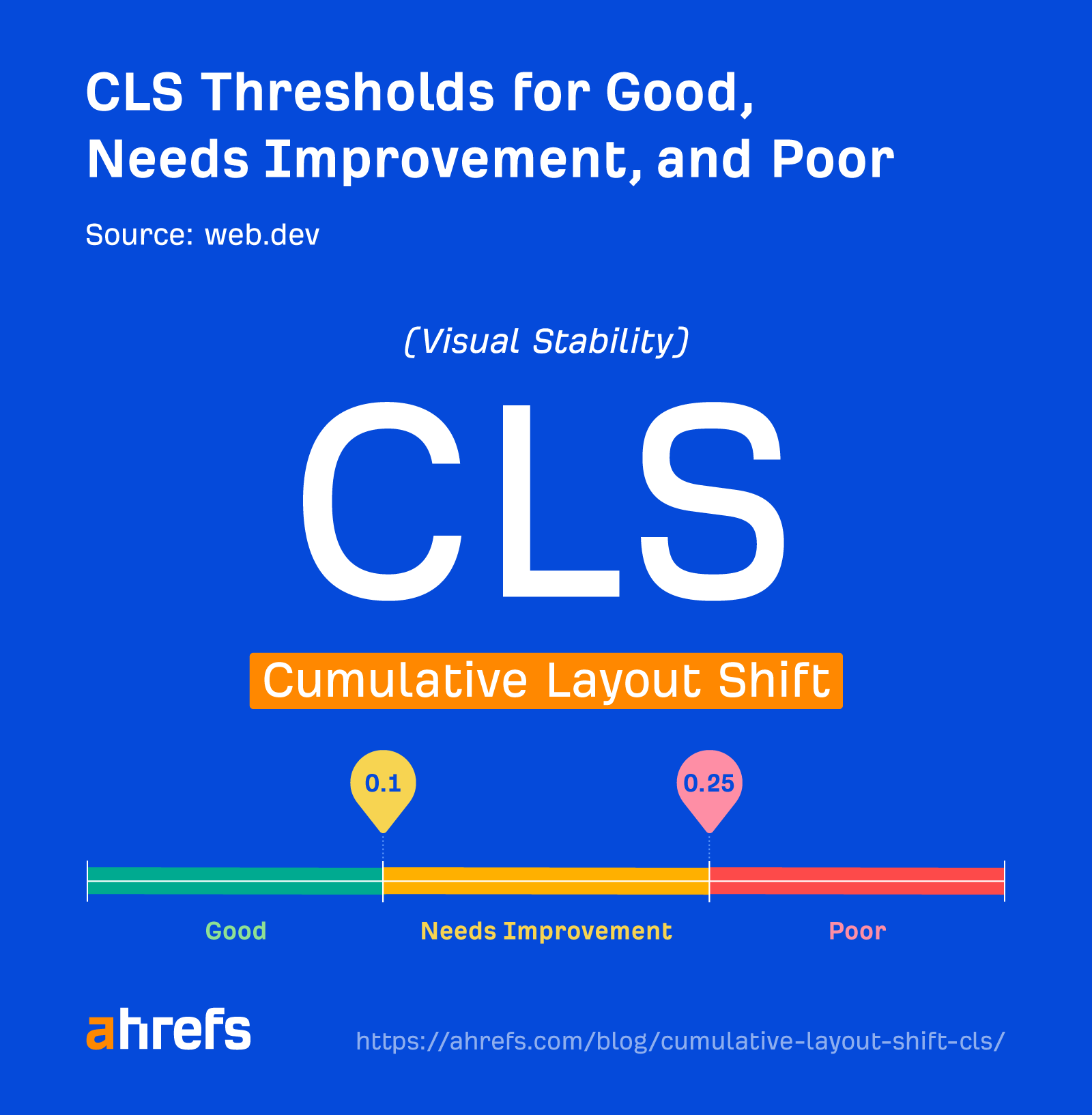
Google publishes clear thresholds for CLS, measured through tools like Google PageSpeed Insights:
- Good: a CLS score of 0.1 or less.
- Needs improvement: between 0.1 and 0.25.
- Poor: above 0.25.
The score is a calculation of how much content moved and how far, so smaller numbers mean a steadier page. Unlike load time, it isn't measured in seconds — it's a unitless score, which is why 0.1 looks like an odd target at first. Remember it simply: lower is always better.
CLS is one of three Core Web Vitals Google uses to assess real-world experience. It's worth reading our full Core Web Vitals guide to see how CLS works alongside loading speed and interactivity to shape your rankings and conversion rate.
Common Causes of Layout Shift on Small Business Websites
Most small business sites are assembled from a theme, some plugins and a handful of images — exactly the combination where CLS problems creep in.
| Common cause | What it looks like | The fix |
|---|---|---|
| Images without set dimensions | A photo loads in and pushes the text below it down the page | Always set width and height on every image and video |
| Web fonts swapping in late | Headings appear in a plain font, then "pop" into your branded font, reflowing lines | Use a font-display setting that keeps a similarly sized fallback font |
| Ads or embeds with no reserved space | A video, map or ad slots in and shoves everything below it further down | Give embeds a fixed minimum height before they load |
| Cookie banners and popups | A banner appears and squeezes or pushes the whole page | Use banners that overlay or slide into reserved space |
| Content injected above existing content | A "sale" banner or reviews widget appears above what the visitor is already viewing | Add new content below the fold, never above what's on screen |
A Real Example: The Menu Page That Kept Moving
Picture a small Hobart cafe with a nicely designed menu page — photos of the parma, the flat white and the Sunday brunch sitting above a prominent "Order Now" button. On a slow mobile connection, the images load a beat after the text, and each one pushes the button further down the screen as it appears. A hungry visitor lines up their tap, the page shifts, and they land on "Our Story" instead. They back out, get annoyed, and order through a delivery app rather than fight the page again.
The same problem turns up on a Gold Coast real estate agency's listings page, just with a different trigger: a "new listing" badge injects itself above the property cards a second after loading, shoving every listing down and causing a buyer to misclick into the wrong property. Nothing is technically broken in either case — the page still works — but the experience feels sloppy, and sloppy costs enquiries.
Practical Fixes You Can Make Without a Developer
You don't need to write code to bring CLS under control. Most fixes come down to giving the browser enough information upfront to reserve space, so nothing has to shove its way in later.
- Always set width and height on images and video. This is the single biggest win available, and it overlaps heavily with the advice in our image optimisation guide.
- Reserve space for embeds, ads and banners by giving that spot a fixed minimum height, rather than letting content appear from nothing.
- Choose a sensible font-display setting so a similarly sized fallback font shows immediately, instead of text dramatically reflowing once your branded font arrives.
- Never insert new content above something the visitor is already viewing — place notifications, banners and promos below the fold or in space that's already reserved.
- Keep your platform and plugins current. A lot of shift on WordPress sites comes from outdated themes or plugins loading inefficiently — our WordPress maintenance checklist covers this in more depth.
How to Test and Monitor Your CLS Score
You don't need special tools to check where you stand. Google PageSpeed Insights is free, requires no login, and scores any page you paste in, with a breakdown of CLS alongside the other Core Web Vitals. Test your homepage, your key service or product pages, and any page with a lot of images or embeds.
A few habits worth building in:
- Re-test after every major update, especially new images, embeds or plugins.
- Test on mobile as well as desktop — slower connections give shift more time to happen.
- Track trends over time rather than chasing one perfect score.
Where CLS Fits Among the Core Web Vitals
Cumulative layout shift is one piece of a bigger picture. Google measures three Core Web Vitals together: how fast your main content appears (Largest Contentful Paint), how quickly your site responds to a tap or click (Interaction to Next Paint), and how stable the layout is while it all happens — CLS. A site can nail one of these and still feel poor overall if it fails the other two, so it's worth treating them as a set rather than fixing one in isolation.
Key Takeaways
- CLS measures unexpected movement on your page — the jumps that make visitors misclick or lose their place.
- Google considers a score of 0.1 or less good, and anything above 0.25 poor.
- Common causes are images without dimensions, late-loading fonts, unreserved ad or embed space, and content injected above what's already on screen.
- Most fixes don't require a developer — reserving space and avoiding late insertions solves the majority of cases.
- Google PageSpeed Insights shows exactly where your CLS problems sit on any page you test.
Frequently Asked Questions
What is a good cumulative layout shift score?
Google considers a CLS score of 0.1 or less to be good. Scores between 0.1 and 0.25 need improvement, and anything above 0.25 is considered poor. You can check any page's score for free using Google PageSpeed Insights.
Why does my website's layout jump around while it loads?
It's almost always because the browser doesn't know the size of something — an image, an embedded video, an ad, or a block of text in a custom font — until that resource finishes loading. Once it arrives, it pushes everything below it out of the way, creating the jump you notice.
Does cumulative layout shift affect my Google rankings?
Yes. CLS is one of the three Core Web Vitals Google factors into how it evaluates page experience, alongside loading speed and interactivity. A jumpy site can be a disadvantage even if your content and SEO are otherwise strong.
Can I fix layout shift myself without hiring a developer?
Many of the biggest wins are things a business owner or content editor can do directly: adding image dimensions, avoiding pop-ups that resize the whole layout, and not inserting new banners above existing content. More technical fixes, like changing how fonts load, are quick work for a web professional if you're not confident doing it yourself.
Do cookie banners and popups cause layout shift?
They can, if they're not built carefully. A banner that pushes the whole page down or up after appearing causes exactly the kind of shift Google penalises. A banner that fits into space already reserved for it, or overlays the page without resizing it, avoids the problem.
Will image optimisation help my CLS score?
Yes. Setting proper width and height on your images is one of the most effective fixes for layout shift, because it lets the browser reserve the right space before the image finishes loading. It's a core part of good image optimisation, alongside compressing file sizes for faster loading.
Get a Website That Doesn't Fight Your Customers
A site that jumps and shifts while people are trying to use it is quietly costing you enquiries every single day, even if nobody ever tells you why. If you'd like your website's Core Web Vitals checked properly and fixed for good, have a chat with Pixel and Pine. We build sites that stay steady from the first second a visitor lands.


